WORK INTELLIGENCE FOR MODERN TEAMS

Know exactly how your team works.

Performance Gear brings time tracking, auto screenshots, daily reports, tasks, leaves and payroll together — one clear view of every report, every task and every hour. Free forever.

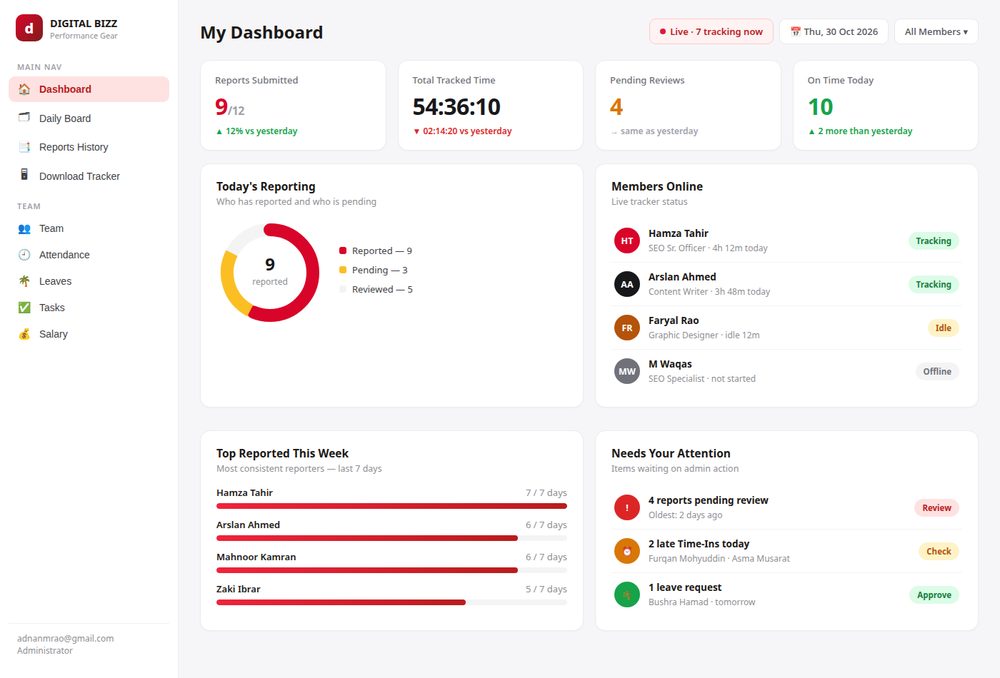
Performance Gear dashboard preview
● 7 tracking nowLive team status
✓ 9/12 reportedToday's reporting
0minauto screenshot interval
0+reports, tasks & HR views
2FAauthenticator-secured sign-in
0%free — no paid plan needed
Who it's for
I came here for…

One platform, shaped around the way you run your team.

FOR OWNERS & ADMINS

Full visibility, zero micromanagement

See who's working, what's done and what needs you — without chasing anyone on chat.

  • Live dashboard of reports, tasks & attendance
  • Approve leaves, fines & reports in one click
  • Payroll computed from approved data only
FOR HR MANAGERS

People ops without spreadsheets

Attendance, leaves, late arrivals and login history — organized and auditable.

  • Late-arrival & login alerts
  • Leave balances with approval flow
  • Complete activity log of every action
FOR TEAM LEADS

Know what your team delivered today

Daily reports land in one place with hours and tasks — review in minutes.

  • Structured end-of-day reports
  • Task assignment with deadlines & auto-fines
  • Weekly consistency tracking per member
The reality
The Reality Most Teams Face

Teams log hours, but outcomes, effort and accountability stay invisible.

✕Time without clarity

Hours are logged but nobody knows what was actually produced in them.

✕Reports without proof

End-of-day updates arrive as chat messages — unverifiable and easy to pad.

✕Payroll without trust

Salaries computed from memory and manual registers invite disputes every month.

The real problem isn't effort. It's not knowing how work actually happens across people, projects and time.

See it clearly →
Features
Everything you need to run your team

One platform replacing scattered chats, spreadsheets and guesswork.

⏱

Live Time Tracking

Staff check in from a lightweight Windows tracker. Late arrivals flag instantly for admin review.

📸

Auto Screenshots

Every 10 minutes a screenshot is captured and stored securely — full proof of work, admin-only viewing.

📝

Daily Reports

Structured end-of-day reports with tasks and hours. Approve or send back with one click.

✅

Tasks & Deadlines

Assign tasks with priorities and deadlines. Missed deadlines auto-generate fines.

🌴

Leaves & Payroll

Leave requests with approval flow, fines ledger, and salary computed from approved data only.

🔐

Bank-grade Security

Authenticator (TOTP) two-factor sign-in, per-device connection tokens, role-based access, audit log.

For every workplace
Collaborate Seamlessly Wherever You Work

Office, remote or hybrid — the same clarity everywhere.

OFFICE

In-office teams

Time In from office PCs, late-start flags and lunch-break tracking keep the floor honest.

REMOTE

Remote teams

Screenshots, app-usage and idle tracking give you the visibility distance takes away.

HYBRID

Hybrid teams

One dashboard for everyone — no separate process for home days and office days.

How it works
Up and running in minutes

No servers to manage, no IT team required.

1

Sign in & secure

Log in with your team email and enroll your authenticator app in under a minute.

2

Install the tracker

Staff run one Setup file on their Windows PC and paste the connection token you generate.

3

Watch it work

Time, screenshots, reports and payroll flow into your dashboard automatically.

Our promise
Designed for Trust. Not Surveillance.

Monitoring breaks morale when it's secretive. Performance Gear is built for open, honest accountability.

👁
Screenshots are admin-only

Captures are viewable only by admins — never shared across the team.

⌨
No keystroke logging

We never record what anyone types. Activity is measured, keystrokes are not.

🔑
Role-based access + audit log

Everyone sees only their own data. Every admin action is logged.

🗄
Your data, your project

Everything lives in your own Firebase project — export or delete anytime.

FAQ
Frequently Asked Questions

Straight answers, no sales talk.

Is Performance Gear really free?

Yes. The web app runs on Firebase's free tier and static hosting, and the Windows tracker is a free download. There is no paid plan, no trial expiry and no locked feature.

Do I need a server or IT team?

No. The dashboard is a static site (hosted on Vercel) connected to your Firebase project. If you can create a Firebase project, you can run Performance Gear.

How do the screenshots work?

The Windows tracker captures a screenshot every 10 minutes while the timer runs. Shots are saved on the PC and uploaded to your storage, and only admins can view them in the dashboard.

Is my team's data private?

All data lives in your own Firebase project under your Google account. Sign-in is protected by authenticator two-factor, staff connect via per-device tokens, and every admin action is written to an audit log.

Will the tracker slow down my staff's PCs?

No. It's a lightweight native app — screenshots are compressed JPEGs (max 1280px) and uploads are small. Most users never notice it running.

What happens if the internet disconnects?

Screenshots keep saving locally on the PC and upload when the connection returns. Time entries sync when the tracker can reach Firebase.

Start Seeing What Your Work Actually Delivers

One Setup file. Install, sign in, paste your token — Time In and you're tracked.

⬇ Download PerformanceGear-Tracker-Setup.exe